Show us yer programming projects!


Re: Show us yer programming projects!
Beautiful.
-
evilpaul

- Baaaa!

- Posts: 811
- Joined: Wed Sep 29, 2004 2:01 pm 0
- Location: #ukscene, helsinki branch
- Contact:
Re: Show us yer programming projects!
I made a glitchy art generator as a bit of an experiment:
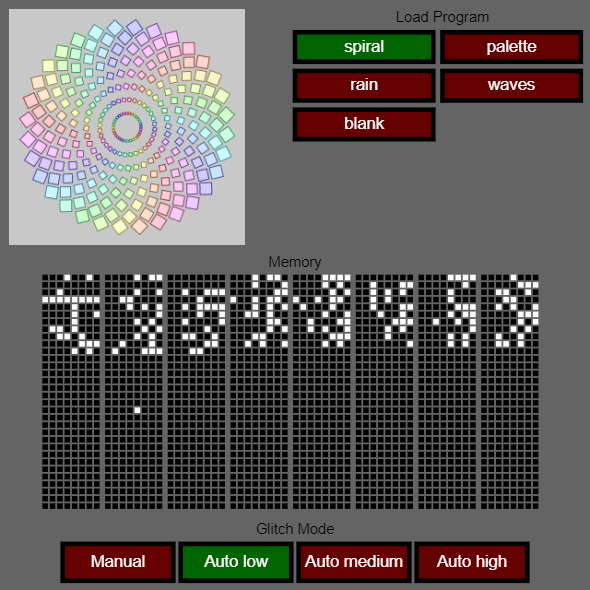
It's based around a fictional 8 bit CPU that has:
- 256 bytes of memory (used to store the program code and also doubles as registers)
- 29 different instructions (including drawing primitives like squres and circles)
- 2 addressing modes (immediate and indirect)
- 2 hardware (ie: not stored in main memory) registers (PC and SP)
The aim was to make a virtual computer that was amenable to glitching caused by purposefully corrupting its memory.
There's a primitive, single pass assembler in there (well, more like a 1.5 pass as it resolves addresses after the first pass without needing to do a whole second pass) and I used that to write a few simple generative art programs. Once a program is loaded you get to see the "in memory" representation of it. From there you can manually toggle bits of memory and watch the results unfold.
Or there's an auto-glitch mode where it randomly flips a number of bits every few frames:

The whole code is available to play with online at https://www.openprocessing.org/sketch/734979/
It's based around a fictional 8 bit CPU that has:
- 256 bytes of memory (used to store the program code and also doubles as registers)
- 29 different instructions (including drawing primitives like squres and circles)
- 2 addressing modes (immediate and indirect)
- 2 hardware (ie: not stored in main memory) registers (PC and SP)
The aim was to make a virtual computer that was amenable to glitching caused by purposefully corrupting its memory.
There's a primitive, single pass assembler in there (well, more like a 1.5 pass as it resolves addresses after the first pass without needing to do a whole second pass) and I used that to write a few simple generative art programs. Once a program is loaded you get to see the "in memory" representation of it. From there you can manually toggle bits of memory and watch the results unfold.
Or there's an auto-glitch mode where it randomly flips a number of bits every few frames:
The whole code is available to play with online at https://www.openprocessing.org/sketch/734979/
[My blog - http://evilpaul.org] [My demos - http://atebit.org] [Twitter - http://twitter.com/evilpaul_atebit][My inspiration - http://bitethis.org]


Re: Show us yer programming projects!
Brilliant.
First I started looking for 'pokes' that would change the drawing behaviour. When I tired of that, I started looking to see how many 'on' bits could be flipped 'off' without (apparently) harming the program. Then I just watched it draw stuff for a while.
10/10.
First I started looking for 'pokes' that would change the drawing behaviour. When I tired of that, I started looking to see how many 'on' bits could be flipped 'off' without (apparently) harming the program. Then I just watched it draw stuff for a while.
10/10.
-
evilpaul
- Baaaa!
- Posts: 811
- Joined: Wed Sep 29, 2004 2:01 pm 0
- Location: #ukscene, helsinki branch
- Contact:
Re: Show us yer programming projects!
Thanks for the nice comments Istar :)
Also.. I made a Windows demo and released it at this year's Assembly this weekend. It came 6th out of 14 entries.
It's up on Pouet.net with a download link:
https://www.pouet.net/prod.php?which=82416
Or just watch the YouTube capture:
Music was done by Gravy under immense time pressure. Thank again Gaz!
Also.. I made a Windows demo and released it at this year's Assembly this weekend. It came 6th out of 14 entries.
It's up on Pouet.net with a download link:
https://www.pouet.net/prod.php?which=82416
Or just watch the YouTube capture:
Music was done by Gravy under immense time pressure. Thank again Gaz!
[My blog - http://evilpaul.org] [My demos - http://atebit.org] [Twitter - http://twitter.com/evilpaul_atebit][My inspiration - http://bitethis.org]


Re: Show us yer programming projects!
Very nice.


Re: Show us yer programming projects!
Great work, as usualevilpaul wrote:Also.. I made a Windows demo and released it at this year's Assembly this weekend. It came 6th out of 14 entries.
It's up on Pouet.net with a download link:
https://www.pouet.net/prod.php?which=82416
 Is that the standard Amiga command prompt font I see? Forget its proper name. Maybe it's something else, I don't remember all those boxart glyphs although it was a long time ago I last saw it.
One thing I'd like to ask, is about framerate. To me, it [subtly] doesn't look "rock steady smooth". Things which I think should be moving at a constant speed [eg all the + signs at the beginning slowly scrolling to the left] feel as if they are "tugging" a bit.
I can't explain it very well but despite FRAPS showing a solid 60Hz, it's almost as if there would be some small aliasing error for the positions everything is drawn at, causing it to be a bit "grainy" in the movement. Or maybe the display portion of code is running at a steady 60 but code to specify what to draw where is not always ready on time.
I've seen this effect/artifact in many games but not everything.
If you know what I mean, any idea what it could be? It's always bugged me when stuff shows 60Hz in FRAPS but you can just "feel" that it isn't.
I've seen really obvious examples, eg in FMV parts of games where you can see it's playing back a 30Hz video or similar but FRAPS is still reporting 60Hz.


Re: Show us yer programming projects!
Topaz? Certainly looks like it.rowan wrote:Great work, as usualevilpaul wrote:Also.. I made a Windows demo and released it at this year's Assembly this weekend. It came 6th out of 14 entries.
It's up on Pouet.net with a download link:
https://www.pouet.net/prod.php?which=82416
"Oh dear lord, I slightly soiled myself. Oxfam won’t be pleased."
-
evilpaul
- Baaaa!
- Posts: 811
- Joined: Wed Sep 29, 2004 2:01 pm 0
- Location: #ukscene, helsinki branch
- Contact:
Re: Show us yer programming projects!
To be quite honest.. I don't know what font I used. I think I just googled for "ms dos font" or something similar and chose one that I liked the look ofrowan wrote: Great work, as usual :) Is that the standard Amiga command prompt font I see? Forget its proper name. Maybe it's something else, I don't remember all those boxart glyphs although it was a long time ago I last saw it.
Hmm.. yeah.. it's possibly an aliasing effect. I can't see it at all on my development computer, but that's maybe because it's an under-powered laptop that doesn't run the demo at a consistent 60fps anyway. If it _is_ graphical aliasing then it should be less visible at high resolution and with anti-aliasing turned on. It's also very possible that some of my post-processing code (bloom. colour correction, etc.) is introducing more aliasing into the pipeline, making the tugging effect more pronounced :(rowan wrote: One thing I'd like to ask, is about framerate. To me, it [subtly] doesn't look "rock steady smooth". Things which I think should be moving at a constant speed [eg all the + signs at the beginning slowly scrolling to the left] feel as if they are "tugging" a bit.
I can't explain it very well but despite FRAPS showing a solid 60Hz, it's almost as if there would be some small aliasing error for the positions everything is drawn at, causing it to be a bit "grainy" in the movement. Or maybe the display portion of code is running at a steady 60 but code to specify what to draw where is not always ready on time.
I've seen this effect/artifact in many games but not everything.
If you know what I mean, any idea what it could be? It's always bugged me when stuff shows 60Hz in FRAPS but you can just "feel" that it isn't.
I've seen really obvious examples, eg in FMV parts of games where you can see it's playing back a 30Hz video or similar but FRAPS is still reporting 60Hz.
I have been told that the YouTube video is "tugging" as well. In fact, it seems that all the YouTube videos from this year's Assembly suffer the same problem. Seems like this wasn't in the original captures that they showed on the big screen during the compos, so there's maybe some conversion problem going on somewhere.
By the way... has anyone tried running at 256x192 resolution yet? ;)
[My blog - http://evilpaul.org] [My demos - http://atebit.org] [Twitter - http://twitter.com/evilpaul_atebit][My inspiration - http://bitethis.org]
Re: Show us yer programming projects!
No worries, thanks for the answer, I was just curious about it all. I wish I could codeevilpaul wrote:Hmm.. yeah.. it's possibly an aliasing effect. I can't see it at all on my development computer, but that's maybe because it's an under-powered laptop that doesn't run the demo at a consistent 60fps anyway. If it _is_ graphical aliasing then it should be less visible at high resolution and with anti-aliasing turned on. It's also very possible that some of my post-processing code (bloom. colour correction, etc.) is introducing more aliasing into the pipeline, making the tugging effect more pronounced
I have been told that the YouTube video is "tugging" as well. In fact, it seems that all the YouTube videos from this year's Assembly suffer the same problem. Seems like this wasn't in the original captures that they showed on the big screen during the compos, so there's maybe some conversion problem going on somewhere.
By the way... has anyone tried running at 256x192 resolution yet?


I just tried 256x192, it kind of looks cooler with those colours
Re: Show us yer programming projects!
I guessing it does Speccy graphics?

Re: Show us yer programming projects!
Looks more like a frame rate mismatch to me.evilpaul wrote:Hmm.. yeah.. it's possibly an aliasing effect.
The "beat" of the tugging remains consistent whatever the speed and direction of the movement of those crosses. If it were aliasing, then it'd vary according to speed and direction, depending on where, within the subpixel, it lands each frame.
But the "tugging" I see in the YouTube video is consistent, which is indicative of a framerate mismatch somewhere along the chain. Particularly if all the captures from the comp exhibit it - that couldn't be aliasing, as every demo likely varies in that - but it could be that the capture computer's rendering / recording / playback has a mismatched framerate somewhere.
To my eye, the "tugging" looks exactly like a well-known problem with TV and film. Most films have traditionally used 24fps. But TV uses 25fps (PAL) or 30fps (NTSC). And those numbers don't divide well. A common trick with PAL is that they just play it back at 25fps and just tolerate the 1fps "speed up" from doing so (though the audio's pitch is therefore raised a little, as you've got to also play that back just a little bit faster to keep the sync. But with 30fps, you can't do that, as a 6fps "speed up" turns things a bit "Benny Hill" in a very noticeable way. So, to make the 24fps fit into a 30fps playback, some of the frames are repeated. As every fourth frame of the original 24fps, you're showing that frame twice to make up the 6fps difference - and so you get a "tugging" effect in any pans or zooms. But it has a consistent "beat" to it, whatever's being displayed, as it's coming from that "fourth frame stutter" that's being put in there, due to mismatched frame rates.
Or, indeed, if you watched American shows (30fps) on a PAL TV (25fps), then it would have a different "feel" to it, due to frame dropping to make up the framerate difference.
Funny thing is, you might not even see it, unless you consciously look for it, because the brain adapts. I watched that YouTube footage and just didn't see the "tugging", until it was mentioned here and then, oh yeah, it's definitely there. We so often see these "framerate mismatches" on TV - between film, NTSC and PAL - that our brains just get used to it and "tune it out".
(Or those folks who went to see "the Hobbit" in 48fps and came out complaining that it "looked like a TV soap opera". Because their brains are used to 24fps when they go to the cinema, and only see higher 30fps footage when watching TV. So their brains were rebelling at seeing "TV framerate" (actually, higher than that, but it's the closest thing in their previous experience) on the cinema screen. To be honest, I'm disappointed that he didn't go for 60fps, just to establish a precedent where, eventually, we could have everything - TV, films, computers, etc. - all running at the same framerate, and internationally so too as a new standard, and removing these mismatches entirely.)
Go into your display settings. What refresh rate is your monitor set to refresh at? Because sometimes people knock it up from 60Hz to, say, 72Hz or higher, as it's less strenuous on the eyes when reading / writing a lot of text to have the framerate of the monitor a little higher. But, by doing so, you are obviously creating a potential "framerate mismatch" with anything that's locked to 60fps.
At least, that's where I'd go looking first. It's possible that the capture computer has had its refresh rate changed at some point - upped to 72Hz - and this is playing havoc with FRAPS trying to capture it at 60Hz, but that machine is actually rendering it at 72Hz. So there's a "stutter" between the two that translates to "tugging" in the footage.
Basically, double check that all the frame rates - including your monitor, as that'll be the thing that, by default, defines the speed of rendering - all line up across the board.
"Words ought to be a little wild - for they are assaults of thought on the unthinking."
- John Maynard Keynes
- John Maynard Keynes

Re: Show us yer programming projects!
I was surprised to see the video was 60fps, tbh, because it didn't feel like 60fps, and watching it frame by frame I see there are lots of doubled frames in it, not regular though like you'd get if it was just a frame rate mismatch, but the sort of thing you get if the screen capture software can't quite keep up.


Re: Show us yer programming projects!
Nothing fancy, just some C++ code to generate points on a Hilbert curve in N dimensions.
Hilbert curve encoding is really handy for some spatial data structures but the traditional recursive algorithms have always been too slow to be practical.
I found a paper describing a much faster method based on gray codes, implemented it and then realised that if you know the size and type of your data up front you can precalculate most of the bit shifts and unroll all the loops.
A bit of depraved template metaprogramming and I have something that is actually fast. Fear this:
https://github.com/spectral3d/hilbert_hpp
Hilbert curve encoding is really handy for some spatial data structures but the traditional recursive algorithms have always been too slow to be practical.
I found a paper describing a much faster method based on gray codes, implemented it and then realised that if you know the size and type of your data up front you can precalculate most of the bit shifts and unroll all the loops.
A bit of depraved template metaprogramming and I have something that is actually fast. Fear this:
https://github.com/spectral3d/hilbert_hpp
Re: Show us yer programming projects!
Pervert.GoatFoam wrote:template metaprogramming
Re: Show us yer programming projects!
I get dirty so you don't have to.venusian wrote:Pervert.GoatFoam wrote:template metaprogramming