Show us yer programming projects!

Coders forum. Discuss techniques, swap code snippets, ask for help etc. relating to all forms of software development.
Post Reply
User avatar
failrate
Baaaaaa!
Baaaaaa!
Posts: 2354
Joined: Sun May 23, 2004 6:54 am 0
Location: Sandy Eggo
Contact:

Re: Show us yer programming projects!

Post by failrate »

The follow-up to the Spammond additive sine synthesis organ is FunkMonkey. I got tired of hardcoding the keys and frequencies, so I added a JavaScript runtime. Now, I can tweak my audio in JS, and I can have dynamic effects like simple envelopes or randomization (like the fritzKey, which plays random harmonics of the fundamental).

Still early days, and I definitely need to figure out how to smoothly transition between frequencies and mix volumes for any given channel. Right now, I get a lot of noise in my envelope. Any recommendations would be greatly appreciated. My google-fu has failed me.

Image
User avatar
piku
Sheepie Whore
Sheepie Whore
Posts: 20960
Joined: Wed Apr 24, 2002 10:44 am 0
Website: Http://Www.ncot.uk
Location: Wakefield
Contact:

Re: Show us yer programming projects!

Post by piku »

[img]http://error_success.piku.org.uk/wp-content/uploads/2009/08/screenshot.png[/img]

At the moment it's just a test of some code I'm writing, draw lines with the mouse and the ball bounces off them. If the ball hits the ends of the line things go a little weird, and I'm not quite sure what to do though.

It's been written in Processing, so if you click here it'll run in your browser assuming you have Java.
return (0);
User avatar
korruptor
Baaaaaa!
Baaaaaa!
Posts: 4291
Joined: Sun Sep 22, 2002 10:35 am 0
Location: Under The Northern Lights
Contact:

Re: Show us yer programming projects!

Post by korruptor »

evilpaul wrote:Hot off the press..

Image
http://pouet.net/prod.php?which=53646

A 64k intro released a few hours ago at Assembly :)
Absolutely lovely. Awesome scratching ;) :D
"Don't go into a trance boys..." :: DJ Mixes
User avatar
failrate
Baaaaaa!
Baaaaaa!
Posts: 2354
Joined: Sun May 23, 2004 6:54 am 0
Location: Sandy Eggo
Contact:

Re: Show us yer programming projects!

Post by failrate »

@piku: That's awesome! If you want to avoid the pong-kabob effect, I would recommend using Rects instead of Lines.
Also, wouldn't it be more DS-like if drawing lines was click-drag-lift? Great demo.
User avatar
piku
Sheepie Whore
Sheepie Whore
Posts: 20960
Joined: Wed Apr 24, 2002 10:44 am 0
Website: Http://Www.ncot.uk
Location: Wakefield
Contact:

Re: Show us yer programming projects!

Post by piku »

failrate wrote:@piku: That's awesome! If you want to avoid the pong-kabob effect, I would recommend using Rects instead of Lines.
That would make it better, but I don't know how to cope with the ball hitting the corners of the rectangles though, since aren't rectangle collisions treated like line collisions once you've worked out which line is the nearest?

I was trying to work this through in my head the other day, and can't work out what should happen if the ball does hit a corner of a rectangle, or if it hits the end of a line. Should it bounce back in the direction it came from, or reflect off (but which way?).
Also, wouldn't it be more DS-like if drawing lines was click-drag-lift? Great demo.
I'd not actually thought much about that bit, the code's just to test the collision and 'bounce' code. Later I get to turn that into some lovely fixed-point maths so it works on the DS.
return (0);
User avatar
beerman
Baaaaa!
Baaaaa!
Posts: 1305
Joined: Wed Dec 24, 2003 11:22 pm 0
Location: The Beercave
Contact:

Re: Show us yer programming projects!

Post by beerman »

Cheat :D
Make the ball a bubble and have it pop if it hits a pointy bit!
"even had I suspected then the truly horrifying suffering and amazing loss of life that would be caused by our well-meaning enterprise... I'd have done it anyway. Only more so."
Lagertron for Android It's Robotron at the pub!
My stuff
User avatar
tufty
Sheepie Whore
Sheepie Whore
Posts: 12525
Joined: Fri Jan 07, 2005 4:52 pm 0
Location: French Alps

Re: Show us yer programming projects!

Post by tufty »

piku wrote: I was trying to work this through in my head the other day, and can't work out what should happen if the ball does hit a corner of a rectangle, or if it hits the end of a line. Should it bounce back in the direction it came from, or reflect off (but which way?).
To do it "right", you need to work out the "surface normal" of the wall relative to a ball that's contacting the line, if you see what I mean.

Step one is working out the nearest point on the line to the ball. If it's on the line, and not past the end, then you have a ball-line collision, and the normal is also the normal to the line. Normal bouncing rules apply.

If the nearest point is "off the end of the line", as it were, then the normal is along the vector from the end of the line to the centre of the ball. Again, normal bouncing rules apply, although you might want to add extra "drag" to the bounce proportional to the difference between the actual line normal and the calculated normal, or something. the only tricky bit here is working out when / where you've actually made the collision.

That's the way I see it, anyway.

Simon
"massive retard™", "full of shit™", "tiny bitch™", "retarted™", "a bit of a one trick pony™", "petty™", "simple minded idealistic twat™", "miserable humourless fucker™"
User avatar
piku
Sheepie Whore
Sheepie Whore
Posts: 20960
Joined: Wed Apr 24, 2002 10:44 am 0
Website: Http://Www.ncot.uk
Location: Wakefield
Contact:

Re: Show us yer programming projects!

Post by piku »

tufty wrote:
piku wrote: I was trying to work this through in my head the other day, and can't work out what should happen if the ball does hit a corner of a rectangle, or if it hits the end of a line. Should it bounce back in the direction it came from, or reflect off (but which way?).
To do it "right", you need to work out the "surface normal" of the wall relative to a ball that's contacting the line, if you see what I mean.
So if there's a box that looks like this

Image

And imagine the ball is at the top of the screen, directly above 'C' and moving diagonally down towards the point half way between 'D' and 'C'.

In that case I'd just work out that line D-C is the nearest and calculate the bounce based on the surface normal of the line D-C.
If the nearest point is "off the end of the line", as it were, then the normal is along the vector from the end of the line to the centre of the ball. Again, normal bouncing rules apply, although you might want to add extra "drag" to the bounce proportional to the difference between the actual line normal and the calculated normal, or something. the only tricky bit here is working out when / where you've actually made the collision.
In this case, the ball is somewhere above the box, out in space off to the right, moving diagonally towards 'C'. It's going to hit the corner. Currently my code goes a bit mental and the ball gets stuck.

From your explanation I should instead calculate the vector that goes from 'C' to the ball, and use that in the maths to calculate the bounce angle?

I work out whether the collision has happened by seeing if the distance between the collision point and the centre of the ball is less than the diameter of the ball. And I work out where the collision point is by doing a line/line intersection test between the line D-C (in this example) and a line that runs out the ball in the direction it is moving.
return (0);
adam
Baaaaaa!
Baaaaaa!
Posts: 4418
Joined: Sat Jun 24, 2006 9:15 pm 0

Re: Show us yer programming projects!

Post by adam »

failrate wrote: Any recommendations would be greatly appreciated.
unrelated but i thought might be of interest:

http://fragsworth.com/audio_functions/1988/
User avatar
failrate
Baaaaaa!
Baaaaaa!
Posts: 2354
Joined: Sun May 23, 2004 6:54 am 0
Location: Sandy Eggo
Contact:

Re: Show us yer programming projects!

Post by failrate »

Holy crap, that is awesome! I love that it lets you evaluate functions right through the text field, so I don't even have to get a function working in C++ or JS to demo it. However, I have to admit my ignorance: I know that t represents time, but what does variable s represent?

[edit] LOL, nevermind. It's right there in the Help link that s represents total seconds passed and t is time scaled such that sin(t) produces middle C
User avatar
PaulCunningham
Baaaaa!
Baaaaa!
Posts: 1218
Joined: Sun Jan 18, 2004 11:47 pm 0
Location: Walsall, England
Contact:

Re: Show us yer programming projects!

Post by PaulCunningham »

piku wrote: I was trying to work this through in my head the other day, and can't work out what should happen if the ball does hit a corner of a rectangle, or if it hits the end of a line. Should it bounce back in the direction it came from, or reflect off (but which way?).
Take a look at this article by Paul Nettle:
http://www.gamedev.net/reference/articl ... le1026.asp

Ultimately he uses it to perform ellipsoid collision in a 3d world but starts off with some simple circle / plane and then circle / line tests and there's lots of pictures too!
Cheers,
Paul Cunningham
Pumpkin Games
User avatar
pogo
Sheepie Whore
Sheepie Whore
Posts: 14180
Joined: Tue Sep 10, 2002 8:28 pm 0
Yahoo Messenger: BrassSparrow
Location: County Durham

Re: Show us yer programming projects!

Post by pogo »

PaulCunningham wrote:
piku wrote: I was trying to work this through in my head the other day, and can't work out what should happen if the ball does hit a corner of a rectangle, or if it hits the end of a line. Should it bounce back in the direction it came from, or reflect off (but which way?).
Take a look at this article by Paul Nettle:
http://www.gamedev.net/reference/articl ... le1026.asp

Ultimately he uses it to perform ellipsoid collision in a 3d world but starts off with some simple circle / plane and then circle / line tests and there's lots of pictures too!
I had a quick look at this, and it does nothing of the sort ! I've worked out the maths for generalised ellipsoid collisions and it's a few order of magnitudes harder than box/sphere/polygon collisions. As he only supplies pseudocode not source code or a working app it's difficult to see what he's actually achieved.

Going back to the original problem, how you bounce a ball off the end of a line is up to you: it's a design problem which is pretty important in Pong, Arkanoid and similar. The most 'realistic' approach, i.e. the one that matches idealised physics of a ball hitting a line, is to think of the lines as having rounded ends and bounce the ball off them. Helpfully Arkanoid makes this explicit by rounding the ends of its bats:
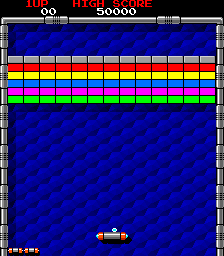
Image

What you do is:

At the point where the ball gets close enough to a line (e.g. dist == ball radius) project it onto the line to see if it is alongside the line or at an end.

If alongside the line reflect it off the line

If not it's at an end. Work out the vector from the end to the ball centre. The reflection then takes place using this vector, i.e. it bounces as if it hit a surface with this vector as normal/perpendicular.

If your ball is small and moving quickly you might need to work out the time too, to get an accurate result. Simplest is something like binary subdivision, i.e. once you detect a collision at t = t1, and they were seperate at t = t0, calculate the seperation at t2 = (t0 + t1) / 2. Then if they are also close enough then check at t3 = (t0 + t2) / 2, otherwise use t3 = (t2 + t1) / 2. Its easiest to this a fixed number of times, as many as you need to get an accurate enough time.
User avatar
PaulCunningham
Baaaaa!
Baaaaa!
Posts: 1218
Joined: Sun Jan 18, 2004 11:47 pm 0
Location: Walsall, England
Contact:

Re: Show us yer programming projects!

Post by PaulCunningham »

pogo wrote:
PaulCunningham wrote:
piku wrote: I was trying to work this through in my head the other day, and can't work out what should happen if the ball does hit a corner of a rectangle, or if it hits the end of a line. Should it bounce back in the direction it came from, or reflect off (but which way?).
Take a look at this article by Paul Nettle:
http://www.gamedev.net/reference/articl ... le1026.asp

Ultimately he uses it to perform ellipsoid collision in a 3d world but starts off with some simple circle / plane and then circle / line tests and there's lots of pictures too!
I had a quick look at this, and it does nothing of the sort ! I've worked out the maths for generalised ellipsoid collisions and it's a few order of magnitudes harder than box/sphere/polygon collisions. As he only supplies pseudocode not source code or a working app it's difficult to see what he's actually achieved.
There's no 'magnitudes harder' if you don't need to consider rotations. You simply scale your world geom so your ellipse becomes a unit sphere.

Here's the full source and a demo app...
http://www.paulnettle.com/pub/FluidStud ... Detection/

EDIT:
There's this as well...
http://www.peroxide.dk/papers/collision/collision.pdf

..based on the same principal and uses sweep tests so you don't have to use sub division if you don't want to.

EDIT2:
And this...
http://www.three14.demon.nl/sweptellips ... ipsoid.pdf

And here's a little movie of a demo I did yonks ago using the Nettle code....
http://www.yakyak.org/download/file.php?id=10324

I could look for the code if you were interested.
Cheers,
Paul Cunningham
Pumpkin Games
User avatar
korruptor
Baaaaaa!
Baaaaaa!
Posts: 4291
Joined: Sun Sep 22, 2002 10:35 am 0
Location: Under The Northern Lights
Contact:

Re: Show us yer programming projects!

Post by korruptor »

Line intersection test from BallZup:

Code: Select all

float kBallManager::CheckLineIntersect( spgVector2 *p1, spgVector2 *s1, spgVector2 *p2, spgVector2 *s2 )
{
  float div = -s2->X*s1->Y + s1->X*s2->Y;
  
  float s = ( -s1->Y * ( p1->X - p2->X ) + s1->X * (p1->Y - p2->Y) ) / div;
  float t = ( s2->X * ( p1->Y - p2->Y ) - s2->Y * (p1->X - p2->X) ) / div;
  
  if ( t >= 0 && t <= 1 && s >= 0 && s <= 1 )
  {
    return t;
  }
  else
  {
    return -1.0f;
  }
}
Where:

p1 is the Ball's start point
s1 is the movement vector for the ball
p2 is the wall's start point
s2 is the length vector for the wall.

Iterate through all the "walls" you want to check against for a collision. The smallest t value returned should be the first collision, so move the ball along: vector * t - it'll now be sat on the point of collision.

This checks from the center of the ball, so to get around that I increased the size the bricks by the ball's radius during the test test. Seemed to hide it quite nicely. Although you do get a case where you can hit more than one brick, it's actually a bonus to the player so I left it. You can do the same for the walls, just check against walls that are moved in a little.
"Don't go into a trance boys..." :: DJ Mixes
User avatar
korruptor
Baaaaaa!
Baaaaaa!
Posts: 4291
Joined: Sun Sep 22, 2002 10:35 am 0
Location: Under The Northern Lights
Contact:

Re: Show us yer programming projects!

Post by korruptor »

pogo wrote: At the point where the ball gets close enough to a line (e.g. dist == ball radius) project it onto the line to see if it is alongside the line or at an end.
I didn't bother with this at all. The case where it was at the end of a horizontal line would also leave the ball on the end of a vertical line. Bouncing on either of these cases (ie: just reflecting on the first one found) looked fine. I treated the bat as a rectangle for the same reasons and you never end up with a bounce angle that left the ball knocking off the two side walls forever.
"Don't go into a trance boys..." :: DJ Mixes
Post Reply