RMD Mouse upgrade

The Joy of Tech - Anything and everything about all things shiny..
User avatar
MattyP
Baaaaaa!
Baaaaaa!
Posts: 2905
Joined: Fri Mar 28, 2003 10:23 pm 0
XBL Gamertag: CypherQ
PSN: CypherQ
Location: Hull, East Yorkshire

RMD Mouse upgrade

Post by MattyP »

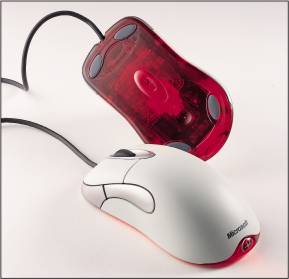
Being using one of these for years (past 12 in fact!!!)

Image

It's getting a bit creaky and yellow and generally looking a bit worse for wear. So decided to upgrade. Things I really like are the nice large side buttons and general feel of the mouse. Stuff I don't like is the creaky build quality (cheap plastics used) - the wheel as it is the old style one that makes a racket when rotated. Other than that love it to bits - probably best mouse I have owned over the years.

Had a few Mice over the years but keep going back to this old faithful one.

So any suggestions!? Just even some feedback on the current ones you use would be great! Spend a lot of time in front of these things so the screen/keyboard and mouse are the three most importing things on my PC really! TIA!
A light that burns twice as bright burns half as long.

Steam/Xbox/PSN User Name: CypherQ
Switch - 8177-9514-5116
User avatar
Dio
Sheepie Whore
Sheepie Whore
Posts: 18887
Joined: Mon May 31, 2004 1:08 pm 0
Location: Newcastle UK

Re: RMD Mouse upgrade

Post by Dio »

Using one of those now, with one more on my laptop and another in my laptop bag for when I'm travelling. By far the best mouse I've ever used. Can't find a modern one half as good. If anyone knows a source where you can still buy 'em I'd have a few more for my debug machine and as spares.
User avatar
MattyP
Baaaaaa!
Baaaaaa!
Posts: 2905
Joined: Fri Mar 28, 2003 10:23 pm 0
XBL Gamertag: CypherQ
PSN: CypherQ
Location: Hull, East Yorkshire

Re: RMD Mouse upgrade

Post by MattyP »

Well had a quick lightbulb moment. Decided to try my iMac Magic mouse on Windows 7 to see how well it worked. With a few drivers added it actually works really well. Even got the back and forward gestures working! So maybe I have found my solution! :)

For those interested:-

I used this driver to get the Magic mouse initially working

and then I used this driver to get the forward/backward gestures working.

All works on Window 7 x64. Of course you'll also need a bluetooth dongle thing attached to your PC if you don't already have bluetooth built in (which for some reason PC motherboards never seem to have bit odd that given the negligible cost of BT these days...)

So that's the mouse problem fixed! :)
A light that burns twice as bright burns half as long.

Steam/Xbox/PSN User Name: CypherQ
Switch - 8177-9514-5116
User avatar
MattyP
Baaaaaa!
Baaaaaa!
Posts: 2905
Joined: Fri Mar 28, 2003 10:23 pm 0
XBL Gamertag: CypherQ
PSN: CypherQ
Location: Hull, East Yorkshire

Re: RMD Mouse upgrade

Post by MattyP »

Dio wrote:Using one of those now, with one more on my laptop and another in my laptop bag for when I'm travelling. By far the best mouse I've ever used. Can't find a modern one half as good. If anyone knows a source where you can still buy 'em I'd have a few more for my debug machine and as spares.
That's the problem! They are too good! Ergonomically it just works for me! Ideally I'd just get a brand new one of these with better build quality and one of those silent type scroll wheels they seem to be putting on the modern mice these days. Still Magic mouse seems to have done the trick and scratched that itch to get a new mouse. Wireless is a nice addition too... :D
A light that burns twice as bright burns half as long.

Steam/Xbox/PSN User Name: CypherQ
Switch - 8177-9514-5116
User avatar
Firefox
Sheepie Whore
Sheepie Whore
Posts: 11412
Joined: Fri Apr 26, 2002 6:15 pm 0
Location: Sheffield

Re: RMD Mouse upgrade

Post by Firefox »

I fiercely love the Logitech laser mice with the metal flywheel scroll wheels (which you can toggle between clicky and freewheeling).

I'm currently using MX1100s, but I think there's a slightly updated version now with an extra thumb button and micro USB recharging.

They are slightly on the pricey side, but it's something I use all day every day so I don't mind.
"I am a very considerate person. If I want to go out all night on my miniature golf course and shoot lizards, well, no reason to keep the neighbours awake..."
User avatar
defsdoor
Baaaaaa!
Baaaaaa!
Posts: 3909
Joined: Fri Jan 30, 2004 12:26 am 0
Location: Sunny Beduff

Re: RMD Mouse upgrade

Post by defsdoor »

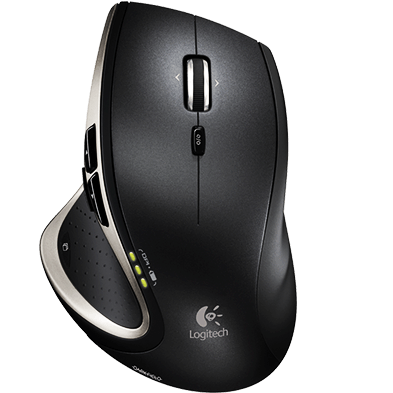
I've got a logitech performance MX - It's probably the best mouse I've ever had
Image
User avatar
RamaBot
Baaa!
Baaa!
Posts: 349
Joined: Sat Feb 04, 2006 1:44 am 0
Location: Coventry, England
Contact:

Re: RMD Mouse upgrade

Post by RamaBot »

Steelseries Kana - The closest thing to an Intellimouse optical 1.1 on the market.

http://steelseries.com/products/mice/steelseries-kana

I upgraded fom the Intellimouse to the Steelseries Xai after many years. The Xai is the mest mouse I have ever used.
User avatar
(o)(o)
Baaaaaaa!
Baaaaaaa!
Posts: 6885
Joined: Tue Jan 19, 2010 2:21 am 0

Re: RMD Mouse upgrade

Post by (o)(o) »

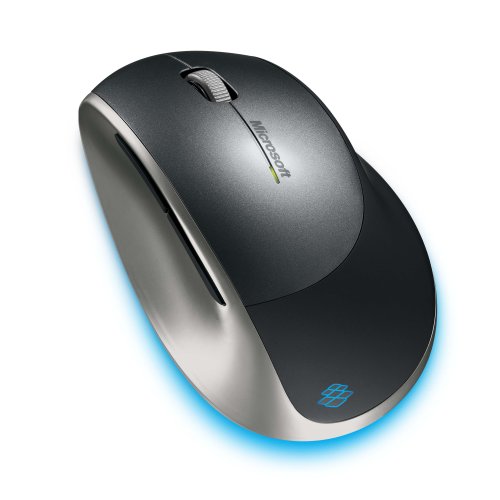
I'm using one of these currently :

Image

This is the third (or fourth?) replacment mouse Microsoft have sent me. If anything breaks, I just phone them up and they send something new and better. :D

It uses BlueTrack technology, which is better on more surfaces, combining optical and laser. It will work on your leg or face, and that's come in useful a few times.

Image

Ergonomically, it's pretty decent. Fairly light and naturally fits the open hand. I don't get along with symmetrical mice. The best mouse I ever had for ergonomics was the original wired Optical Explorer, which was like a handrest.
User avatar
MattyP
Baaaaaa!
Baaaaaa!
Posts: 2905
Joined: Fri Mar 28, 2003 10:23 pm 0
XBL Gamertag: CypherQ
PSN: CypherQ
Location: Hull, East Yorkshire

Re: RMD Mouse upgrade

Post by MattyP »

(o)(o) wrote:I'm using one of these currently :

Image

This is the third (or fourth?) replacment mouse Microsoft have sent me. If anything breaks, I just phone them up and they send something new and better. :D

It uses BlueTrack technology, which is better on more surfaces, combining optical and laser. It will work on your leg or face, and that's come in useful a few times.

Image

Ergonomically, it's pretty decent. Fairly light and naturally fits the open hand. I don't get along with symmetrical mice. The best mouse I ever had for ergonomics was the original wired Optical Explorer, which was like a handrest.
Looks really intriguing! Lots of tech in there!

The Apple magic mouse experiment seems to be going well.... Only slight downside to it is the amount of time Windows seems to want to take to connect to a bluetooth device! The blinking computer boots from cold quicker! (thanks to the spangly new SSD drive I recently put in...)
A light that burns twice as bright burns half as long.

Steam/Xbox/PSN User Name: CypherQ
Switch - 8177-9514-5116
User avatar
Portland
Baaaaaaa!
Baaaaaaa!
Posts: 8828
Joined: Thu Apr 06, 2006 8:16 am 0
Location: Swinton, South Yorkshire

Re: RMD Mouse upgrade

Post by Portland »

Another Logitech fan here after my last Razer died.

MX518 - old tech, but pleasing.
Portland 3.0.1.0 public release rolled out
User avatar
Salty
Baaaaaa!
Baaaaaa!
Posts: 2082
Joined: Wed Mar 03, 2004 8:29 pm 0
XBL Gamertag: salty69
Location: Middlesbrough
Contact:

Re: RMD Mouse upgrade

Post by Salty »

Another Logitech fan. I did love my Intellimouses (Intellimice?) while I had them.

At the mo I'm using one of these Logitech G400 mice on my gaming rig with a Steel Series hard pad and it's awesome.

Worth the £35 I spent on it easily.
User avatar
disciple
Sheepie Whore
Sheepie Whore
Posts: 13941
Joined: Mon Oct 27, 2003 11:33 pm 0
XBL Gamertag: LiberMentis
PSN: Prime_Heretic
Location: Greenfield
Contact:

Re: RMD Mouse upgrade

Post by disciple »

Everyone likes their own mouse.

I gave away one of those original MS laser mice, could never get a decent grip on it because of the 'skirt' bit.
also hated tge Logitech MX due to the ridic:lously bad battery life it had after 6 months use.

The Ligitech iFeel is clearly the best mouse.
PS4 : Prime_Heretic
Steam: bitstorm
Elite Dangerous: Cmdr Britain
User avatar
MattyP
Baaaaaa!
Baaaaaa!
Posts: 2905
Joined: Fri Mar 28, 2003 10:23 pm 0
XBL Gamertag: CypherQ
PSN: CypherQ
Location: Hull, East Yorkshire

Re: RMD Mouse upgrade

Post by MattyP »

defsdoor wrote:I've got a logitech performance MX - It's probably the best mouse I've ever had
Image
Well I finally upgraded my mouse to one of these yesterday. Have to agree a great mouse! Not the cheapest but TBH keyboards, mice and monitors are the three things I don't mind spending money on. It's the three items that you spend most of your time using on a PC!

Considering my last mouse (the MS one) I had for 13years..... hope this one gives equally good service. Looks like you can replace the rechargable battery easily which is nice.

Forgotten how much I liked Logitech mice... not had one for a while. Great bits of kit. Certainly not as "creaky" as my old MS one which is a bonus. Really liking the "freewheel" mode!
A light that burns twice as bright burns half as long.

Steam/Xbox/PSN User Name: CypherQ
Switch - 8177-9514-5116
User avatar
Loada
Baaaaa!
Baaaaa!
Posts: 1741
Joined: Sat Sep 07, 2002 2:17 pm 0
Location: North Yorkshire, UK

Re: RMD Mouse upgrade

Post by Loada »

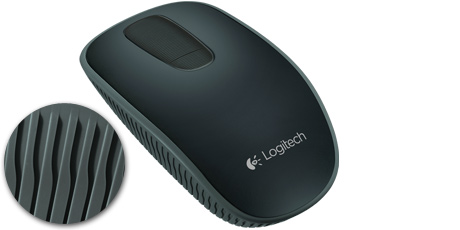
I've recently got one of these to smooth my upgrade to Win8 (desktop) and I really like it:
Image
http://www.logitech.com/en-gb/product/z ... 400?crid=7
It's wireless and uses a tiny USB dongle (which you can chain other Logitech wireless devices to e.g. keyboards).

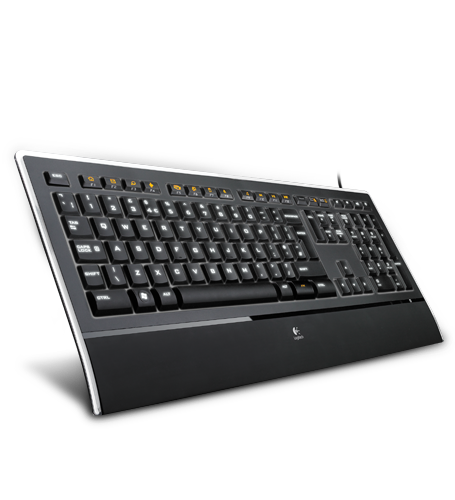
I also got a Logitech illuminated (wired) keyboard round about the same time and that's very nice too:
Image
http://www.logitech.com/en-gb/product/4740?crid=26
User avatar
MattyP
Baaaaaa!
Baaaaaa!
Posts: 2905
Joined: Fri Mar 28, 2003 10:23 pm 0
XBL Gamertag: CypherQ
PSN: CypherQ
Location: Hull, East Yorkshire

Re: RMD Mouse upgrade

Post by MattyP »

Was looking at one of those too.... but like the tactile feel a wheel gives when playing some games.... Tried playing a few games with the Apple magic mouse and it just didn't "feel" right for me! Great for all other work though. Cool thing about the MX is that it has a little button on it to take the wheel out of "clicky" mode and makes scrolling through huge docs ultra quick!

Yes my mouse has one of those dongles too! Called a Logitech Unified system.... Quite handy if you have a laptop and move between two workplaces....

As for Windows 8.... well it's looking like Linux is going to be my next move after I'm done with Win7 TBH. Steam is now on there for games and openoffice for docs etc. :) Had a play with Windows 8 and really not so sure about it.....
A light that burns twice as bright burns half as long.

Steam/Xbox/PSN User Name: CypherQ
Switch - 8177-9514-5116
Post Reply